
Connect
Add AuditGate to CI/CD
Scan every deploy to staging and stop releases that introduce serious problems.
The usual setup: deploy to staging, run an AuditGate scan, and only promote to production if the scan passes.
1. Create a CI token#
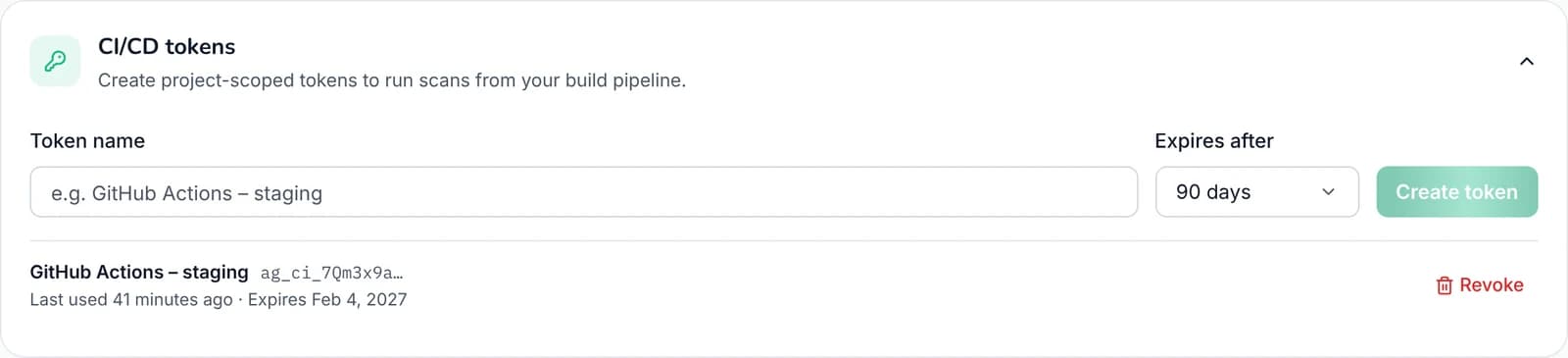
In Project settings → CI/CD tokens, name the token after the pipeline that will use it and pick an expiry. Copy it straight away; it's only shown once. Only workspace owners can create tokens, and your plan needs API access.
 123
1Name it after the pipeline that uses it
2Choose how long it lasts
3Revoke a token you no longer need
Save three secrets in your CI system. The card shows your exact API URL and project ID.
AUDITGATE_API_URL=<API URL from the card>
AUDITGATE_PROJECT_ID=<project ID>
AUDITGATE_CI_TOKEN=ag_ci_…
2. Add the scan script#
This script starts a scan, waits for it, and fails if there are critical or high findings. Save it in your repository:
#!/usr/bin/env bash
set -euo pipefail

API="$AUDITGATE_API_URL/v1"
AUTH="Authorization: Bearer $AUDITGATE_CI_TOKEN"

SCAN_ID=$(curl -fsS -X POST -H "$AUTH" \
  "$API/ci/projects/$AUDITGATE_PROJECT_ID/scans" | jq -r '.data.id')
echo "Started scan $SCAN_ID"

for _ in $(seq 1 90); do
  SCAN=$(curl -fsS -H "$AUTH" "$API/ci/scans/$SCAN_ID")
  STATUS=$(echo "$SCAN" | jq -r '.data.status')
  [ "$STATUS" = "complete" ] || [ "$STATUS" = "failed" ] && break
  sleep 20
done

[ "$STATUS" = "complete" ] || { echo "Scan did not complete: $STATUS"; exit 1; }

CRITICAL=$(echo "$SCAN" | jq '.data.findingsBySeverity.critical')
HIGH=$(echo "$SCAN" | jq '.data.findingsBySeverity.high')
echo "critical=$CRITICAL high=$HIGH"
[ "$CRITICAL" -eq 0 ] && [ "$HIGH" -eq 0 ] || { echo "Blocking issues found"; exit 1; }
3. Run it in your pipeline#
GitHub Actions#
jobs:
  deploy-staging:
    runs-on: ubuntu-latest
    steps:
      - uses: actions/checkout@v4
      - run: ./scripts/deploy.sh staging

  auditgate:
    needs: deploy-staging
    runs-on: ubuntu-latest
    steps:
      - uses: actions/checkout@v4
      - run: ./scripts/auditgate-scan.sh
        env:
          AUDITGATE_API_URL: ${{ secrets.AUDITGATE_API_URL }}
          AUDITGATE_PROJECT_ID: ${{ secrets.AUDITGATE_PROJECT_ID }}
          AUDITGATE_CI_TOKEN: ${{ secrets.AUDITGATE_CI_TOKEN }}

  deploy-production:
    needs: auditgate
    runs-on: ubuntu-latest
    steps:
      - uses: actions/checkout@v4
      - run: ./scripts/deploy.sh production
GitLab CI#
auditgate:
  stage: security
  image: alpine:3.20
  before_script:
    - apk add --no-cache bash curl jq
  script:
- ./scripts/auditgate-scan.shJenkins#
stage('AuditGate') {
  steps {
    withCredentials([
      string(credentialsId: 'auditgate-ci-token', variable: 'AUDITGATE_CI_TOKEN'),
      string(credentialsId: 'auditgate-project-id', variable: 'AUDITGATE_PROJECT_ID'),
      string(credentialsId: 'auditgate-api-url', variable: 'AUDITGATE_API_URL'),
    ]) {
      sh './scripts/auditgate-scan.sh'
    }
  }
}
Choosing when to block#
Start by only reporting for a week: run the scan but don't fail the build. Fix what it finds, then block on critical findings, and later on high ones too. A gate that fails on day one tends to get switched off.
See results in GitHub#
To show findings in GitHub's Security tab, fetch the scan as SARIF and upload it. This needs the security-events: write permission, and GitHub Advanced Security on private repositories.
- run: |
    curl -fsS -H "Authorization: Bearer $AUDITGATE_CI_TOKEN" \
      "$AUDITGATE_API_URL/v1/ci/scans/$SCAN_ID/sarif" | jq '.data' > auditgate.sarif
- uses: github/codeql-action/upload-sarif@v3
  with:
sarif_file: auditgate.sarifCommon errors#
| Status | Means | Fix |
|---|---|---|
| 401 | Token missing, expired or revoked | Create a new token |
| 402 | Out of scans this month, or no API access on your plan | Upgrade, or wait for the monthly reset |
| 403 | Wrong project ID, or the domain isn't verified | Check the project ID; verify the domain |
| 409 | A scan is already running | Wait, or make deploys run one at a time |
| 429 | Too many requests | Poll less often |